Paradox Table File Recovery
tvDMX
(just in case anyone
TP-Links
BYRONref.com
book reference database
Read my book!
One Thousand Years
Vronni's Money Saver
email: rb@randybeck.com.
- Finally!
- What Earth Would Look Like With Rings Like Saturn
- Delphi on Windows 7
- More on Unit BDEreset
- Don't forget Copy and Paste for objects
- Paradox Corruption
- Give your users tools
- The Apollo Space Comment
- Why I Use Delphi
- The Versatility of TPanel
- function QuestionBox()
- Unit BDEreset;
- Unit MyInfo;
- function PxBuild()
- TEncryptionStream = class(TFileStream)

I put a few items here, mostly of interest to Delphi and Lazarus programmers, and will be adding more intermittently.
Finally!

One Thousand Years by Randolph Beck
Science fiction: alternative history, time travel and WWII.
--
What Earth Would Look Like With Rings Like Saturn
--
Delphi on Windows 7
If you've been wondering, Marco Cantu reports Windows 7 is more compatible with old Delphi applications than Vista.
Microsoft always regretted being left out of the Y2K problem. That's why they invented Vista.
--
More on Unit BDEreset
I discovered a problem with my BDEreset unit when transferring to a new PC with Vista.
It still works just fine if Delphi is not installed, but it hangs up if it is. It may just be way my PC is configured. Of course, it may be that none of my users has both Vista and Delphi on their PCs. I'm working on a solution.
To see the unit, scroll down, or or click here. I am still using it, as there is nothing else that's practical for me. I don't expect to be putting that much effort into a BDE app anyway at this late date.
The unit works by starting the BDE, checking the NET DIR value, and then closing the BDE. The problem happens when it tries closing the BDE. It just hangs there. My temporary solution is to check if Delphi is installed before running that part of the unit, but it's a clumsy way of doing it. That part is not yet in the source.
--
Don't forget Copy and Paste for objects
Have you ever used the Cut or Copy, functions for objects on the IDE and then Paste to see it on a text editor? It's sometimes easier to work with it that way.
It'll come in handy for those of you who need to replace components when making massive program changes -- like when replacing a TTable with another derivative class. My previous post mentioned switching from the BDE to something else. It's a chore when you've got dozens (or hundreds) of TTable objects in your application.

Here's an example of a TTable. Grab it with the mouse, Copy it to the Windows clipboard, Paste into a notepad, and you'll get this:
object YourTable: TTable
  BeforePost = YourTableBeforePost
  AfterPost = YourTableAfterPost
  AfterDelete = YourTableAfterPost
  DatabaseName = 'DB'
  TableName = 'BOOKS'
  TableType = ttParadox
  Left = 8
  Top = 160
end
What's this kind of thing good for?
Let's say that you finally decide to switch your Paradox TTable objects to something else.
Since the new tables will have similar fields, it's often easier to revise this on a notepad.
You will need to create one in Delphi first, and paste that into the notepad as well, so as to learn precisely what needs to be added, removed, or modified.
For example, you can just change the TTable declaration to the new class. You'll want to remove
When you're done, Copy the text from notepad and Paste it back into the form on Delphi's IDE. Then you could follow the same pattern to replace all the others in your project.
Pasting visual objects to the notepad is useful in a lot of other ways. If you've never tried it, I suggest doing so just to get an idea of what's practical.
--
Paradox Corruption
I've been asked for information on stopping Paradox corruption. This topic used to be posted on Delphi boards everywhere back when Paradox was still popular (using the word "popular" loosely).
Years ago, Delphi Magazine had an excellent article on this that you can still find at archive.org's mirror. That article is ten years old. Some of it may not be as important as it once was.
I've found the most important step you can take is this one: "Call dbiSaveChanges in the TTable's AfterPost event handler."
The article is specific to Delphi. I hope it can be adapted for those of you who use Paradox tables with something else. For example, for the old Paradox Engine, opening your tables with saveEveryChange parameter turned on (in function PxTblOpen) has the same effect as would calling dbiSaveChanges after posting in Delphi.
It's not going to stop all the errors (you'll still want to scan them regularly) but they can be reduced dramatically. This might help keep you sane until you finally switch to something other than Paradox.
Give your users tools
Have you ever run a program and needed to enter a character that's not on your keyboard? You probably clicked the Windows Start button, and found the character map in the programs list.
Wouldn't it have been convenient for that program to have a key or a popup menu to bring it up?
This is a minor function you can add to your own Delphi programs in a matter of minutes.
Have the program check your Windows folder, or your
A link to Calc.exe could be convenient for some of your data entry programs, too.
Just something to think about.
--
The Apollo Space Comment
Pardon me while I write a note about space. There are those who say we've stopped exploring, and I'm not letting the 40th anniversary go by without a word.
Scroll down if you're just looking for my little bits of Delphi stuff.
In thinking about space, our expectations are often measured by the book and movie 2001: A Space Odyssey. It's a good yardstick because it has a vision and a date, so I'm going to use it here.
People look at this movie and see we were supposed to have reached deep space before now, and they think we just gave up on the dream. But they're really looking at it all wrong. We really exceeded that.
For those who don't know, the book 2001 was written by Arthur C. Clarke, who established his futurist bona fides proposing the use of communications satellites. You'd say that idea was realized. Most people see it that way, and here's where they're not connecting the big picture.
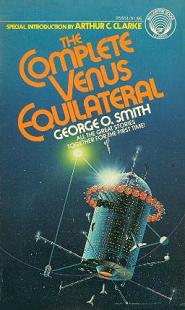 Clarke writes about this in his 1976 introduction to George O. Smith's
THE COMPLETE VENUS EQUILATERAL, which had a theme of space communications:
Clarke writes about this in his 1976 introduction to George O. Smith's
THE COMPLETE VENUS EQUILATERAL, which had a theme of space communications:
We both thought that our "extraterrestrial relays" would be large, manned structures carrying armies of engineers -- as, indeed, will one day be the case. Neither of us dreamed that most of the things we described would be done -- within twenty years! -- by a few pounds of incredibly miniaturized electronic equipment.
This was back in 1945. That was two years before the first transistor. The notion that it could all be automated with microchips just didn't occur to them.
The Manned Orbital Laboratory is another example along these same lines. This was going to be America's first space station. The Air Force selected military astronauts (this was not a NASA program), and they expected to be up there by the early '70s. Alas, microchip technology progressed very quickly, and we got spy satellites to do what that station would have done.
Had it not been for all these computer advancements, we'd have had dozens of space stations aloft for all these years, some military and some civilian. While I'd love to imagine space colonies busy in orbit, the somewhat-less-adventurous truth is that our satellites are far superior to the massive vacuum tube cities in space that Clarke had predicted all those years ago.
So, think of all those satellites as automated space stations. That's what they are, and there are a lot more of them up in space than all the sci-fi writers had ever dreamed.
This brings me back to 2001: A Space Odyssey and what else was actually accomplished.
If you remember the plot -- after the cavemen, of course -- you see Dr. Heywood Floyd stop at a space station, and then make his way to the moon to visit the center of a magnetic anomaly. Did we continue exploring the moon like that after the last Apollo moon trip? Well, yes, we did.
In real life, the Lunar Prospector was launched in 1998. It scanned the moon from orbit for the next year and a half. Among other things, it searched for magnetic anomalies and did find one. (No, it didn't land to dig up anything in the center; we can't have everything.)
What about a mission to Saturn as in the book 2001?
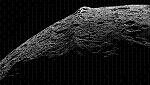 The Cassini-Huygens mission took a Jupiter-fly-by-route to Saturn just like in the book.
Cassini snapped this picture of Saturn's moon Iapetus.
If you've read the book, you may recall Iapetus is where the second monolith stood. See?
We did get there after all.
Sure, Cassini was automated, but it got the job done.
What more would astronauts really expect to do there anyway?
Besides, they only made it as far as Jupiter in the movie.
The Cassini-Huygens mission took a Jupiter-fly-by-route to Saturn just like in the book.
Cassini snapped this picture of Saturn's moon Iapetus.
If you've read the book, you may recall Iapetus is where the second monolith stood. See?
We did get there after all.
Sure, Cassini was automated, but it got the job done.
What more would astronauts really expect to do there anyway?
Besides, they only made it as far as Jupiter in the movie.
This isn't to say I don't see any value to having astronauts out there. I'm just pointing out we made it into the 21st century on schedule. The exploration of space did not end with Apollo.
On the other hand, one way that we are behind the accomplishments of 2001 is in artificial intelligence. Science hasn't been able to create anything like the HAL-9000. That's particularly ironic, seeing as how we've explored space by automation.
And while there is no orbital Hilton like in the movie, had there been one in real life, I think it's safe to say that Dr. Floyd would not have needed that phone booth to call his daughter. Let's count our blessings.
--
UPDATE: NPR leads off a story with a comparison to 2001 that leads into space tourism and Virgin Galactic. Most of the 21st century is still ahead of us.And on July 20th, Gregory Manchess at Tor writes a short piece about what a man could do on the moon that a machine (at the time, anyway) could not. J. Storrs Hall of Foresight has a good explanation of why manned spaceflight stopped moving outward. The graph is depressing for space buffs but the conclusion is much more optimistic.
Why I Use Delphi
Nick Bradbury has a good post on Why I Use Delphi. The comments are also worth reading.
BTW: My email was having problems. It should be better now.
--
The Versatility of TPanel
Here's a tip for relatively new Delphi programmers that may also be worth reviewing for those who've been at it for so long that they just hadn't stopped to look. This will be obvious to a lot of you reading this, in which case you can scroll down. It's something I wish I had paid more thought to when I was first working in Delphi.
When creating a form, it's common to grab visual components and manually place them right on the form. That's how most of the lessons and examples show you to do it, and it's usually just fine. But it's not so good if you've got a big form, particularly if you're going to add fields to it later.
Get into the habit of using TPanels when you design forms, and pay close attention to which ones Align with the client or the top, bottom, right, or left. (Align is a property in the TPanel component.) Aligning all the panels above, below, and beside each other is the reason I bring this up. You'll want them all interconnected. Then put your controls on the panels.
If you do this correctly, you'll be able to resize the form without buttons scrolling out of view. The result is a form that's easier to go back to and add fields. Set the bevels to bvNone when you don't want the separate panels to be noticable, which is in most cases. Don't forget to set each panel's caption to a blank.
Panels are essential for resizable forms with a lot of fields. This one uses panels within panels:
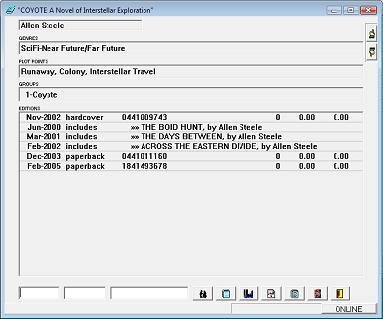
Several panels at the bottom remain fixed in place, and many more at the top also remain fixed. The largest area is one big panel with a grid inside it. It has Align set to alClient so that this is the region that changes size when the form is resized or zoomed.
For that example panels are more-or-less essential. Of less importance, I also did something like it in my little BDE checker program. It only needed a simple dialog box but it's made with several panels so that I could adjust the size while programming (although the user can't).
QuestionBox (see the post below) uses a lot of panels but it differs slightly in that it was designed to allow hiding any of the lower buttons if they aren't used. It didn't matter on that form that the buttons scroll out of view in design time because the height is determined later.
This may not seem so important for forms that aren't going to be resized by the user, but you'll be glad anyway when you as a programmer need to modify it later.
--
function QuestionBox()
I was hesitant to upload this one because I would think Delphi should already have something like it. They already have several dialog boxes for asking a question or displaying an error message. This function works along those lines.
QuestionBox asks a question and lets the user pick from up to five options:
function QuestionBox(AQuestion,AResponses: string) : integer;
AQuestion is simply a string with the question you ask:
'Where would you like to go today?'
You can insert line feeds with the ^J character like this:
'Where would you'+^J+'like to go today?'
AResponses is one string holding up to five responses separated by apostrophes (";").
'Sail to Bermuda;Fly to Paris;Launch to Orbit'
The responses may also include "&" to indicate hotkeys.
It returns the numbers 1 through 5, based on the option selected,
or 0 if the user cancelled or pressed Esc.
  Case QuestionBox('Where would you like to go?',
              'Sail to &Bermuda;Fly to &Paris;Launch to &Orbit')
  of
    1:   Dest := 'Bermuda';
    2:   Dest := 'Paris';
    3:   Dest := 'Orbit';
  else   Exit;  { user cancelled }
  end;
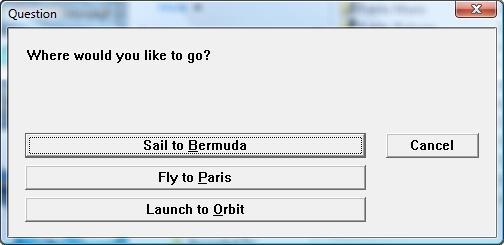
Note: You can have up to five responses.
The dialog box's caption is "Question" but it can be modified at the global variable QuestionBoxCaption.
The height of the question area can be modified at QuestionBoxPanelHeight.
Download QUESUNIT.zip
(2,171 bytes) --
Unit BDEreset;
This is for programmers still using the Borland Database Engine and who have encountered the inevitable Vista problems with their Delphi programs.
As you ought to know by now, the BDE defaults to placing its NET DIR in the root directory ("C:\"), which is not permitted under Vista.
BDEreset will check the NET DIR location, and move it into the common AppData folder if necessary. I haven't yet concluded that this is the best location, but I'm keeping it there for now. You may revise the source if you think otherwise.
Note: My first thought was to use the Windows Temporary folder, but I realized this may cause trouble if the user changes.
This unit must be declared at the top of the uses declarations so it will be initialized before other units. It will not work properly if the BDE is initialized first.
The NET DIR location is checked (and fixed if necessary) during the unit's initialization process. Once the unit has been added at a suitable position in your project, you don't need to do anything else with it.
Download BDEreset.pas
(4,868 bytes) --
(revised June-9 and July-2-2008)
Note: I received a note on the About Delphi board that says it can't detect the application directory with limited user permission. I'm caught off guard by this, as I had thought that common AppData would work fine, but it makes sense given that the unit actually creates a new folder under that one. It now uses the folder that the BDE is in. -- July-2-2008
Note 2: I discovered a problem with this when installing Delphi 6 to a new PC with Vista. It works just fine if Delphi is not installed, but it hangs up if it is. It may just be way my PC is configured. Of course, it may be that none of my users has both Vista and Delphi on their PCs. I'm working on a solution. -- October-10-2009
Unit MyInfo;
This unit has nine functions to return information about the user's PC.
I try to limit this page to items that may be hard to find elsewhere. Although some of this stuff has become easier to find, the first one is not.
In other words, copying files to this location will cause
Windows to tell the user there are files waiting to be burned to the CD.
If you need a way to backup files to a CD, this may be one solution.
AFAIK, this won't work on Windows versions prior to XP Service Pack 2
in which case it will return an empty string.
.
CopyThisFile('C:\MyProject\MyFile.txt', CDPrepDirectory+'MyFile.txt');
My experience has been that WindowsRegisteredOwnerName will return a usable value about 75% of the time, and WindowsRegisteredOrganizationName will return a value less than 10% of the time. Business PC's seem to return a value less often than home systems, but your results will probably vary from mine.
They will always have a trailing backslash ("\") even if the registry entry didn't supply one. This allows you to append a filename without worrying about a backslash, like this:
- CreateThisFile(DesktopDirectory + 'MyFile.txt');
The information is only retrieved from the registry once. It is stored in local variables for subsequent calls to these functions.
Download MyInfo.pas
(6,182 bytes) --
function PxBuild()
This unit contains a procedure to easily create Paradox tables with optional index files.
Here is a sample usage:
Success := PxBuild(Database1.Handle, 'Example1.db',
NewSItem('Account, N*',
NewSItem('Transaction, S*',
NewSItem('Name, A20+',
NewSItem('Amount, $',
nil))))
);
Each field must be defined by field name and type, followed by an optional asterisk ("*") and/or plus ("+"), to indicate a key field or index.
The NewSItem function is also included in this unit. Some programmers may recognize it from the old Turbo Vision days.
Download PxBuildr.pas
(7,433 bytes) --
TEncryptionStream = class(TFileStream)
The primary benefit of TEncryptionStream is that it may be quickly substituted for a TFileStream, without having to change anything else in your programs. The encryption is not world-class by any means (in fact, it's extremely weak), but it may be your only encryption option when using a third-party tool that works with streams.
It will perform a very simple encryption as it reads or writes the data. It's a quick enhancement that keeps most users from prying without major hassles on your part.
You'll need to run this stream on your data (a simple demo program included with the .ZIP file may be used for this purpose). Then replace any use of that file on TFileStream with TEncryptionStream.
I recommend that programmers who use this should change the value of the global constant DefaultEncryptionCode. And if you want something a little more secure, you can rewrite the Encode and Decode methods.
You'll notice that the encryption is performed one byte at a time, and that this severely limits the degree of sophistication that may be possible. But any serious method (like DES) would add more rules to how this stream may be used, and that wasn't my intent.
Download Encoders.zip
(1,839 bytes) --
 Paradox Table File Recovery...
 Return to main page